vrijdag 13 december 2013

Export to an external directory (Schedule Batch)

A customer called me that he would like to know why he could not select an ‘Export’ folder in the schedule Batch option.


After some debugging I found out that we had to change some things in the ‘FRConfig.cmd’. Located here: <Middleware_home>\EPMSystem11R1\products\financialreporting\bin\FRConfig.cmd
 
Within this file you have to change the ‘Java_home’ like:
set JAVA_HOME="D:\Oracle\Middleware\jdk160_29"
But then we had the problem that we could not save the entry in the ‘Mbeans’ So I found out that you have to change also the ‘setInstance.cmd’ file (in the same directory)
set EPM_ORACLE_INSTANCE=D:\Oracle\Middleware\user_projects\epmsystem1
Now when you start the FRConfig.cmd and go to: MBeans à com.hyperion à attributes à ExportFolders you can fill in the share or disk where you want to export the reports.
 

Remember to put is as follows: Name=share
ReportShare=\\<hostname>\Export_Report_folder
Restart you EPM system and your done:
 

zondag 22 september 2013

Essbase Error (1020011): Maximun number of rows [5000] exceeded.

Some days ago a client called with a problem in smartview.
He was making a large sheet but when retrieving he was getting a error:


The solution was ‘simple’:
In the APS  (Provider Services) there is a file that limits the maximum records that can be retrieved.


You can edit the file ‘essbase.properties’ to remove the limit.

To find the file , you can just go to the webpage of your installation:
http://localhost:9000/aps/APS (in weblogic)
http://localhost:19000/aps/APS (in OHS)


Edit the file ‘D:\Oracle\Middleware\EPMSystem11R1/common/EssbaseJavaAPI/11.1.2.0/bin/essbase.properties' so that smatview can retrieve more than 5000 records.

Go to the following line: ‘service.olap.dataQuery.grid.maxRows’
# Specifies maximum rows/columns for dataquery grid. 0 value indicates no limit.
#service.olap.dataQuery.grid.maxRows=5000
service.olap.dataQuery.grid.maxRows=0
service.olap.dataQuery.grid.maxColumns=255


Keep in mind that Excel has a limit in record that can be handled:
Excel 2003: 65536
Excel 2010: 1048576


Restart the APS and your done.

zaterdag 24 augustus 2013

Error(1042006) Network error [10061]: Unable to connect to [hostname:port] Essbase 11.1.1.3


A couple of weeks ago a customer of mine had a strange error:


Error(1042006) Network error
[10061]: Unable to connect to [xxxxxxxxxxxxx.xxxxxx.xxxxx:142]. The client timed out waiting to connect to Essbase Agent using TCP/IP. Check your network connections. Also make sure that server and port values are correct]

This error was when he wanted to add a ‘location alias’ in EAS. Also when he wanted to do a ‘Xref’ it did not work and the business rules we not working correct.
Solution
After some long digging around I found the problem: EAS and Essbase can’t function when the essbase name in EAS has more than 30 characters (incl port number).

After I removed the essbase server from EAS and added a new one (shortened) the error did go away and my customer could work again with EAS.

maandag 13 mei 2013

EAS outline won’t expand or members can’t be created.


Ever had the problem when installing EAS client that you can't expand the outline of your essbase cube/program.

Well I had to do some digging but found the problem. When users are using the EAS console the program want’s to write something in a specific directory

‘D:\Oracle\Middleware\EPMSystem11R1\products\Essbase\eas\console\temp’

You have to change the permissions of this directory in order to let the users make use of the EAS program. You need to have 'write' permissions set for the users that are using the EAS client.
 

donderdag 14 maart 2013

PKI-02002: Unable to open the wallet. Check password

A few days ago, a customer called and said that he could not login in EAS anymore. But when he was using HPL (Planning) or Smartview he could connect to the essbase.

I did some basic checks, and found the problem:
  • Disk where EPM was installed was 100% full (743kb free space).
  • EPM was not starting up anymore, after a restart
  • Log was showing:

oracle.security.jps.internal.credstore.ssp.CsfWalletManager openWallet
 WARNING: Opening of wallet based credential store failed. Reason java.io.IOException: PKI-02002: Unable to open the wallet. Check password. oracle.security.jps.service.credstore.CredStoreException: JPS-01050: Opening of wallet based credential store failed. Reason java.io.IOException: PKI-02002: Unable to open the wallet. Check password. at oracle.security.jps.internal.credstore.ssp.CsfWalletManager.openWallet(CsfWalletManager.java:177) at oracle.security.jps.internal.credstore.ssp.SspCredentialStore.doInit(SspCredentialStore.java:218) at oracle.security.jps.internal.credstore.ssp.SspCredentialStore.<init>(SspCredentialStore.java:140) at oracle.security.jps.internal.credstore.ssp.SspCredentialStore.<init>(SspCredentialStore.java:127) at oracle.security.jps.internal.credstore.ssp.SspCredentialStoreProvider.getInstance(SspCredentialStoreProvider.java:114)
 
Solution
Because the disk was complete full the file ‘cwallet.sso’ was corrupte.
Oracle states that you could place a backup or generate a new file. This could be done:

ORACLE_MW_HOME/oracle_common/bin/orapki wallet create -wallet ORACLE_MW_HOME/user_projects/domains/EPMSystem/config/fmwconfig -auto_login_only

This solution did not work for me. EPM still does not start up and EAS was unable to login essbase.
The real solution was simple:

  • Rename ‘ORACLE_MW_HOME/user_projects/domains/EPMSystem/config/fmwconfig/cwallet.sso’ to ‘ORACLE_MW_HOME/user_projects/domains/EPMSystem/config/fmwconfig/cwallet.sso_corrupt’.
  • Copy ‘ORACLE_MW_HOME/user_projects/domains/EPMSystem/config/fmwconfig/bootstrap/cwallet.sso’ to the directory ‘ORACLE_MW_HOME/user_projects/domains/EPMSystem/config/fmwconfig/’
  • Restart EPM and your done.

zaterdag 16 februari 2013

Error connecting to database connection : Class not registered

Ever wondered why you get a ‘Class not registered’ when you are adding a database connection within workspace in release 11.1.2.2?


Well here is the deal: In 11.1.2.2 the HFM client is altered, and you cannot configure the DCOM user. So instead of configuring it within the client you now have to do it in the Oracle EPM itself.
• First: stop all Oracle EPM processes (stop the complete EPM suite)
• Second: install the ‘HFM Adm Driver’ if you didn’t already.
• Third: configure the DCOM in the ‘EPM Sytem Configurator’.
• Fourth: Start Oracle EPM again.


Now you could go to the workspace and add a database connection to the Financial Management.
 

zaterdag 9 februari 2013

Change the default Oracle HTTP server page


When you are installing Oracle EPM with an Oracle HTTP server you will see the next page.


This is the default page of the Oracle HTTP server (OHS). Several of our customers do not want to see this and asking me to change this to the default login page.

Below are the steps to change this:


1.      Login the foundation server (web server).
2.      Create a backup of the file:
$EPM_ORACLE_HOME\EPMsystem1\httpConfig\ohs\config\OHS\ohs_component\htdocs\welcome-index.html. 

3.      Edit the file and remove everything that is inside the file and replace it with:

<html><head>
   <title>Oracle EPM 11.1.2.x</title>
         <meta http-equiv="refresh" content="0; url=http://the.url.to.your.epm.server:19000/workspace/index.jsp">
   </head>
     <body>
         <p>
         Click to goto the Oracle EPM workspace: <a href=" http://the.url.to.your.epm.server:19000/workspace/index.jsp"> http://the.url.to.your.epm.server:19000/workspace/index.jsp</a>
         </p>
     </body></html>


4.      Save the file and go to the page in your web browser. If it doesn’t work please force a refresh and/or clean your temp internet files and try it again

woensdag 5 december 2012

Excel 2003 vs Excel 2010 with Smartview – Big data templates


A few days ago some customers of mine had troubles with Excel sheets created in Excel 2003 and opening in Excel 2010 with Smartview .

Excel will freeze, and will not work anymore. After some debugging and created a SR with Oracle we came across the following which solved the problem.

Open Excel - Smartview -> Options -> Advanced-> under Compatibility enable

"reduce excel file size"
"Improve metadata storage"

zondag 25 november 2012

Timeout Smartview


A few weeks ago some customers had issues with Smartview and the retrieval of some data. If they wanted to fetch data that took longer that x seconds Smartview would give them the following error.


After some digging around: google, metalink. I found out that the issue had to do with the versions of IE (IE7, IE8, IE9 and IE10). Microsoft changed the timeout settings to 30 seconds. Preciously (IE 6) this was 60 seconds.

To resolve this issue, the default timeout settings must be modified. You can change this to do the following: start ‘regedit’ and browse to

"HKEY_CURRENT_USER\Software\Microsoft\Windows\CurrentVersion\Internet Settings"

Add the following variables:

KeepAliveTimeout
ServerInfoTimeout
ReceiveTimeout


Remember to make it a DWORD (32bit) and add a hexadecimal value of 900000. This will timeout after 15 min. Once you changed it logout as the user an log back in and your set to go and retrieve a dataset.

EPMA 11.1.2.1 and HFM 11.1.2.1.104 bug

Just to give you a heads up.
 
The bug I described in http://got2be-hyperion.blogspot.nl/2012/10/epma-patch-11121600-bug-parameter.html
 
Is also there in the 11.1.2.1.104 patch, if you want to duplicate the HFM application use the 'copy application util'  or LCM.


donderdag 11 oktober 2012

EPMA patch 11.1.2.1.600 BUG! / parameter incorrect.


After the installation of a few new patches release by oracle :
  • 14224664 (EPMA)
  • 14119724 (BI+)
  • 14354419 (HFM)
  • 14142678 (HSS)

We came across some strange behavior within EPMA. We made a duplication of an excising application in the ‘application library’. All went okay and we did not see any errors.
But when we wanted to open the original application we got the following error:


We did check the Job console log for this job and found something ‘nice’… yep A real Oracle bug. Within the  job log we can see the they did not made a copy of the database objects but a rename ?!?! guess it was a Monday morning when they had a test on this patch J.

Anyhow I made an SR at Oracle an development is now working on it.
Keep you posted. BUG number 14748197

donderdag 4 oktober 2012

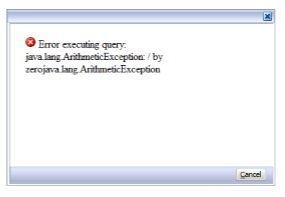
Error executing query: java.lang.ArithmeticException: / by zerojava.lang.ArithmeticException

During some changes in security we came across some strange errors when attempting to load a Report.

Users could access the report but get an error when opening these reports.


Error executing query: java.lang.ArithmeticException: / by zerojava.lang.ArithmeticException 

Explanation:
The POV that the user set in FR Studio applies to all users automatically.  It  could be a security issue because some users do not have the correct security setting to access the POV. 


Solution:
Login to Workspace > Explore > File > Preferences > Financial Reporting > User Point of View > Preview. Make sure the "On" option is selected.


woensdag 15 augustus 2012

Required application module reporting.reportViewer is not configured


When trying to open a Financial Reporting report the following error message occurs:

"Required application module reporting.reportviewer is not configured"

looking in the ‘details’ we see: 

URI: http://hostname:19000/hr/xml/HRConfig.jsp

Status: 401 - Authorization Required

Content: text/html; charset=UTF-8
<!DOCTYPE HTML PUBLIC "-//W3C//DTD HTML 4.0 Draft//EN">
<HTML>
<HEAD>
<TITLE>Error 401--Unauthorized</TITLE>
<META NAME="GENERATOR" CONTENT="WebLogic Server">
</HEAD>
<BODY bgcolor="white">
<FONT FACE=Helvetica><BR CLEAR=all>
<TABLE border=0 cellspacing=5><TR><TD><BR CLEAR=all>
<FONT FACE="Helvetica" COLOR="black" SIZE="3"><H2>Error 401--Unauthorized</H2>
</FONT></TD></TR>
</TABLE>
<TABLE border=0 width=100% cellpadding=10><TR><TD VALIGN=top WIDTH=100% BGCOLOR=white><FONT FACE="Courier New"><FONT FACE="Helvetica" SIZE="3"><H3>From RFC 2068 <i>Hypertext Transfer Protocol -- HTTP/1.1</i>:</H3>
</FONT><FONT FACE="Helvetica" SIZE="3"><H4>10.4.2 401 Unauthorized</H4>
</FONT><P><FONT FACE="Courier New">The request requires user authentication. The response MUST include a WWW-Authenticate header field (section 14.46) containing a challenge applicable to the requested resource. The client MAY repeat the request with a suitable Authorization header field (section 14.8). If the request already included Authorization credentials, then the 401 response indicates that authorization has been refused for those credentials. If the 401 response contains the same challenge as the prior response, and the user agent has already attempted authentication at least once, then the user SHOULD be presented the entity that was given in the response, since that entity MAY include relevant diagnostic information. HTTP access authentication is explained in section 11.</FONT></P>
</FONT></TD></TR>
</TABLE>

</BODY>
</HTML>

Also if you want login into Hyperion Reporting Financial Studio you are getting the following error:

You Are Not Authorized to Use This Functionality

The problem is that the directory: $Hyperion_Home\EPMsystem11r1\common\ADM\11.1.2.0\lib is empty (no .jar files).

Solution:

1. Copy the .jar files from a working server into the folder of the non-working machine.
2. Restart the Financial Reporting services.


zaterdag 21 juli 2012

Error: ActiveX component can't create object: 'fdmFM11xG5E.clsFMAdapter'


During testing of the FDM and HFM implementation of a 11.1.2.1 environment we came across this error:

‘Error: ActiveX component can't create object: 'fdmFM11xG5E.clsFMAdapter' 

at first we thought this had to do with the adapter itself. But after some tracing, the problem was that the HFM client on the FDM server was not configured.

Now we had to configure the FDM client, but after adding the HFM server / HFM cluster we had a APPCRASH of the HFM client:
‘Fault bucket , type 0
Event Name: APPCRASH
Response: Not available
Cab Id: 0

Problem signature:
P1: HFMConfigure.exe
P2: 11.1.2.3082
P3: 4d3f5242
P4: ntdll.dll
P5: 6.1.7601.17725
P6: 4ec4aa8e
P7: c0150010
P8: 000000000006f892
’
I reinstalled the HFM client on the FDM server and could now connect to the HFM cluster. The error has gone away.

But now we had a differed error in the FDM application: ‘Error: Adapter Function [fConnect] Failed’.
Now this was an easy one, the credentials of the DCOM user were not correct.

Just re-run the FDM configuration steps, and make sure that the DCOM user password is valid.
remember to restart the IIS once you changed the FDM configuration steps. 


zondag 1 juli 2012

High Contrast within a second.


Within Oracle EPM (Hyperion) you can change the ‘Normal’ layout and change it to a ‘High Contrast’ layout.

Below are te steps (it’s really simpel).

First goto your login screen:  http://[hostname]:19000/workspace/

Now : [ctrl]+[shift]+h
Click 'OK'

Click 'Retry'

Now you will see that your inlog screen is different from the one before.

Workspace is different. 


Change it back to ‘Normal’ mode

Click again [ctrl]+[shift]+h
Click 'OK'


Click 'Retry' 


and your back to normal. 

vrijdag 22 juni 2012

The Application cannot be deleted, the state of the application is MigratePending


The last few days i had the opportunity to do a bit of bug fixing in Oracle EPM.
A customer of mine had trouble to delete a Application from the Application Library. The error that he had was “The Application cannot be deleted, the state of the application is MigratePending.URI: http://xxx.xxxx.xxxx:19000/awb/integration.deleteDeployedApplication.do
Code: com.hyperion.awb.web.common.BaseServiceException
Description: The Application cannot be deleted, the state of the application is MigratePending.
Actor: none
”
So after a while searching in log files I could not find any error… go figure.

Below are the steps that I did (with a little help of Oracle J ).
Trying to delete the application:  
Look at the Properties ‘Status : Migrate Pending’


Right click the application and select ‘Delete’

Select ‘Yes’

Here you get the Error.

How to solve the problem:
* Stop the Hyperion environment (or just the EPMA service)
* Login to the Database (SQLPLUS / TOAD / SQL Developer):

<SQL> SELECT *
<SQL> FROM ds_application
<SQL> WHERE C_APPLICATION_NAME = '[application_name]';
Write down the I_APPLICATIPON_ID:  i.e. 20

<SQL> SELECT *
<SQL> FROM or_object
<SQL> WHERE c_object_id LIKE '%20'
Check if the application name is correct in X_OBJECT_DATA

Now edit / modify the ‘X_OBJECT_DATA’

Change the following:
status=”64” to status=”2”

remove the line:
<pendingDeployment transId="……."><dateTime>……….</dateTime></pendingDeployment>

Commit the change.

Start up Hyperion again (or the EPMA services).

Now login to workspace an goto the Application Library:

Select the Application you want to delete and click ‘Diagnostics’

Select all the tests an click ‘Run Selected Tests’

Now you will see that the test ‘Inconsistent Status’ will Fail. Now select ‘Synchronize status information in the database’ and click ‘Apply’

Click ‘Yes’

Now everything will pass, except ‘Deployed but missing from Shared Services’. Select this.

Now you can select ‘Delete from EPMA only’ and click ‘Apply’

Click ‘Yes’


 Now you’ll see that all have the status ‘Not Applicable’. Because the application is not there any more.


In the Application Library the application will be gone. 

zondag 29 april 2012

The big windows 3gb switch mystery.

Last couple of days I was called to give a solution for an Hyperion 9.3.x problem.  When they started the ‘Reporting’  server they got a message ‘The system cannot log you on due to the following error: Not enough resources are available to complete this operation. Please try again or consult your system administrator’


Everything was working fine but for some reason they could not start the Reporting services.  After a while when we wanted to logon into the server to investigate, we could not get in.

So we did a search (for 2 days).
The problem was that there were some changes been made in the ‘Security updates by Microsoft’ (incl. service packs).

When you install drivers, patches, SP or anything. Windows will consume a bit more memory. Because there had been a modification in the ‘boot.ini’ and windows only had 1 GB to use, there was a threshold  being overwritten.
So every time when you login the resources weren’t there.

We had to remove this option in order to make Windows server 2003 accessible for us and to make Hyperion start.

So whenever you are planning to update drivers, apply patches or anything make sure that you have enough resources available. Also consider the use of PAE (http://msdn.microsoft.com/en-us/windows/hardware/gg487512)